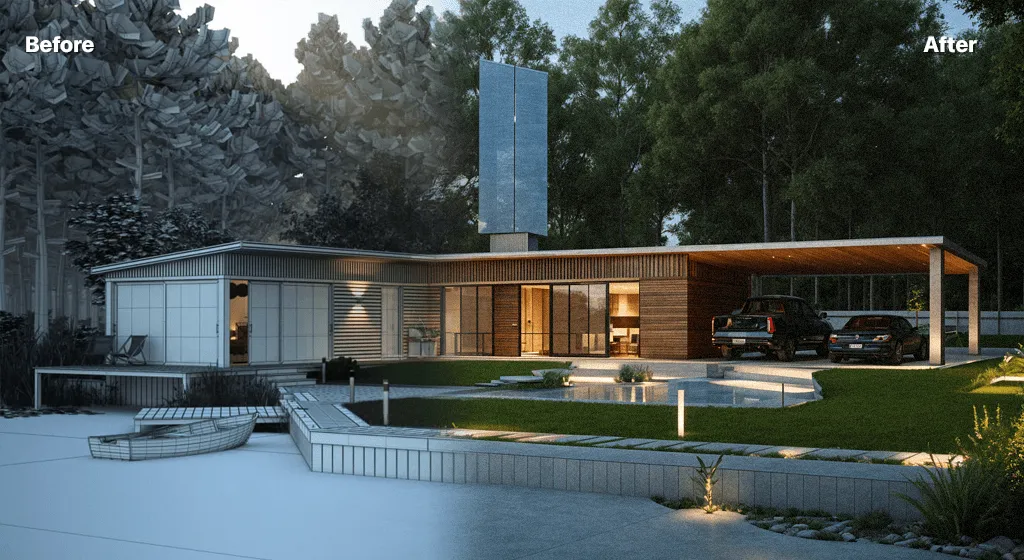
Architectural ideas rarely arrive fully formed. A project may begin with a loose sketch, a basic massing model, a screenshot from design software, or even a photograph marked up with a few notes. The difficult part comes next: turning that early thinking into something clear enough for other people to understand. Traditionally, producing a polished visual at this stage could mean building detailed models, assigning materials, setting lighting, and waiting for renders before a design discussion could really move forward.
Tools such as AI Render Studio are introducing another option. Instead of treating a polished image as something that only appears near the end of a modelling process, architects and designers can use AI-assisted rendering to explore visual directions much earlier. It does not remove the need for professional judgement or detailed technical work. What it changes is the speed at which an idea can become visible, discussable, and open to revision.
Early Design Has Always Needed a Faster Feedback Loop
The beginning of an architectural project is usually full of uncertainty. Should the façade feel heavier or lighter? Would warm stone work better than exposed concrete? Does the entrance need more contrast? What happens if the same scheme is presented at dusk rather than in bright daylight?
These are not always questions that require a perfectly finished 3D model. Often, the team simply needs to see an idea clearly enough to decide whether it deserves further development.
That is where conventional rendering can sometimes feel disproportionate to the task. Spending hours refining materials and lighting for a concept that may be discarded during the next design review is not always the best use of time. AI-assisted visualisation gives teams a way to test possibilities before committing to that level of production.
The value is not simply that an image can be made faster. The real benefit is that design conversations can start sooner.
Turning an Architectural Starting Point Into Something More Visual
An AI Architecture Generator can be especially useful when a project already has a visual starting point but needs more atmosphere, material definition, or context.
For example, an architect might have a simple viewport showing the overall shape of a residential building. At that stage, the geometry may be enough to communicate scale but not enough to answer questions about character. An AI rendering workflow can help explore how the concept might look with different façade materials, landscape treatments, weather conditions, or lighting moods.
That makes the process useful for questions such as:
- Would timber cladding make the elevation feel too domestic?
- How would the entrance read with darker materials?
- Does adding mature planting soften the mass of the building?
- Would a brighter interior make the glazing more prominent at dusk?
- Is the overall mood appropriate for the intended location?
None of those tests automatically produces a final design decision. They simply give designers more visual evidence to work with.
Visualisation Becomes Part of Thinking, Not Just Presentation
Architectural rendering has often been associated with presentation: an image prepared once the design is reasonably settled. AI is beginning to shift that relationship.
A visual can now serve as a design sketch in its own right.
Consider an early façade study. A designer may know that the building needs a strong horizontal rhythm but remain uncertain about materials. Instead of developing several detailed material setups from scratch, the team can explore multiple visual directions first. One may use light masonry, another weathered metal, and another a combination of concrete and timber.
Seeing those options side by side can reveal issues that are difficult to judge from abstract material names alone.
This does not mean every generated image should be treated literally. In fact, doing so would be a mistake. AI-generated visualisations are most useful when they provoke questions: What do we like about this version? Which parts feel wrong? What should be carried back into the actual design?
That makes them part of an iterative process rather than an automatic answer.
Client Conversations Can Become More Productive
One of the harder parts of architectural work is communicating an unfinished idea to someone who is not trained to read plans, elevations, or basic 3D views.
Design professionals may understand a simple massing model immediately. A client may only see a grey object.
A more developed visual can bridge that gap.
Imagine discussing two entrance options for a house. On a plan, the difference may appear fairly small. Once the schemes are shown with realistic materials, planting, shadows, glazing, and an understandable sense of scale, the client can respond to them more confidently.
The conversation changes from:
“What will this actually look like?”
to:
“I prefer the second version, but could the entrance feel warmer?”
That is a much more useful discussion.
AI visualisation can therefore help reduce the gap between professional design language and everyday visual understanding. It gives clients something concrete to react to while the design is still flexible enough to change.
More Options Do Not Automatically Mean Better Design
There is an obvious temptation with fast visual generation: keep producing alternatives.
Ten façade styles become twenty. Then someone tries another material. Then another lighting setup. Soon, a team has a folder full of attractive images but no clearer design direction.
Speed only helps when it is paired with judgement.
A useful approach is to define the question before creating alternatives. Instead of asking AI to “make this building look better,” a designer can work around a specific issue:
Material question: Which palette fits the surrounding context?
Atmosphere question: Should the space feel calm and residential or active and urban?
Landscape question: How much planting is needed to soften the hardscape?
Presentation question: Which lighting condition communicates the proposal most clearly?
By narrowing the purpose of each visual experiment, the team can compare results more intelligently.
It also prevents AI from becoming a source of endless variation with no real connection to the project brief.
Where Human Design Decisions Still Matter Most
A convincing architectural image can be powerful, but visual quality should never be confused with technical validity.
An AI-generated concept may suggest materials, vegetation, furniture, lighting, or architectural details that were not part of the underlying design. Some of those additions may be useful inspiration. Others may be impractical, structurally impossible, commercially unrealistic, or inconsistent with planning requirements.
That is why professional oversight remains essential.
Architects still need to consider matters such as:
- spatial planning and circulation;
- dimensions and accessibility;
- structure and construction;
- building regulations and codes;
- environmental performance;
- material suitability;
- costs and procurement;
- site constraints;
- planning requirements;
- long-term maintenance.
AI rendering can support the visual side of a project, but it cannot replace the technical responsibility behind a building.
The distinction matters particularly when generated images are shown to clients. Teams should be clear when an image represents a concept rather than an exact promise of the finished result.
A Useful Companion to Existing Design Software
Another misconception is that AI visualisation has to replace the software architects already use. In practice, it makes more sense as an additional step within an existing workflow.
A project might still begin in SketchUp, Revit, Rhino, AutoCAD, Blender, or another modelling environment. The designer develops the geometry using the tool that best suits the project. A screenshot or exported visual can then become the starting point for quicker aesthetic exploration.
If an AI-generated direction proves useful, those decisions can return to the working model.
For example, the team might discover that vertical timber fins give a façade the depth they were looking for. The fins would then need to be properly designed, dimensioned, modelled, and tested within the actual project rather than simply copied from a generated picture.
That back-and-forth relationship is more realistic than viewing AI as a replacement for CAD or BIM.
Better Rendering Can Also Encourage Better Iteration
Perhaps the most interesting impact of AI rendering is not the final image at all. It is what happens before the final image.
When visual experiments are expensive in terms of time, teams naturally limit how many they produce. When early visualisation becomes easier, there is more room to question assumptions.
A designer might discover that the original material palette is too busy. Another version may reveal that the building looks stronger with less decorative treatment. An evening visual might expose the importance of interior lighting. A landscape study could show that the entrance needs a clearer pedestrian approach.
These observations can influence the architecture itself.
In that sense, AI visualisation is most valuable when it leads back to design thinking rather than simply producing a prettier presentation.
The Best Results Begin With a Clear Design Intention
Like most creative tools, AI tends to become more useful when the person using it already has an idea of what they are trying to achieve.
A vague instruction may produce an attractive picture, but attractiveness alone does not make it relevant to a project.
Before creating a visual, designers can ask a few basic questions:
- What part of the design are we testing?
- What information should remain unchanged?
- What can be explored freely?
- Who needs to understand the resulting image?
- What decision should the visual help us make?
Those questions keep the workflow connected to architecture instead of allowing image generation to become an isolated creative exercise.
Conclusion
AI rendering is changing architectural visualisation because it moves useful imagery closer to the beginning of the design process. Sketches, model views, and early concepts can become clearer visual studies without requiring every option to go through a full traditional rendering workflow.
Its strongest role is not replacing architects or eliminating detailed visualisation. It is helping design teams explore possibilities, communicate with clients, compare alternatives, and identify promising directions before investing heavily in a particular solution.
Used with a clear brief and professional judgement, AI-assisted visualisation can make the early stages of architecture more responsive. The technology may generate the image, but deciding what the image means and whether it belongs in the project remains a human design responsibility.